Thursday, 17 September 2026
Every year since 2007, Apple has debuted a new flagship iPhone. Other than the just plain “iPhone” original, they all have numbers of some sort in their name. If you make a list of them in order, it’s a bit of a marketing curiosity that the only one of the bunch whose number in its name corresponds to its generation number is the iPhone 4, which was in fact the fourth iPhone. (The “ten” in iPhone X marked 10 years, but it was the 11th flagship model.)
The iPhone 18 Pro, in fact, heralds Apple’s 20th iPhone generation:
I compiled this list from memory. I had to double-check a few of the milestone notes, but I literally remember every single new flagship iPhone. And I don’t really have a particularly good memory. The fact that Apple has just incremented integers annually since the iPhone 11 makes that easier. But the iPhone is unique in this way. I can sort of do it off the top of my head with the major Apple II models: II, II Plus, IIe, IIc, IIGS.2 But I can’t do it with iPads, and I don’t think there’s even a way to make such a list for Macs.
Maybe next year Apple will commemorate the 20th anniversary with an iPhone 20 (there’s no way they’re going to call it “XX”, right? Right?). They skipped right over 9, and could do the same with 19. But the iPhone 18 Pro and Pro Max are the 20th new flagship models. That’s something.
But … is the 18 Pro even the flagship iPhone of this generation? Apple first started launching multiple phones the same year with the “unapologetically plastic” 5C alongside the 5S. Starting with the simultaneous unveiling of the forgettable iPhone 8/8 Plus and unforgettable iPhone X in 2017, Apple has launched multiple models at different tiers each fall. But it’s always been obviously clear which iPhone was the iPhone.
This year, it’s not quite so obvious. Apple made no mention of the plain no-adjective iPhone 18 last week, and, now that I think about it, no one in the media wondered where it was. Apple never said “It’s coming early next year” and no one asked. Nor did Apple mention the year-old iPhone Air or offer even a hint that a sequel is coming alongside the 18 and 18e in early 2027.
But the 18 Pro debuted alongside the iPhone Duo. The Duo got the anchor spot in the announcement keynote. The Duo is getting the billboards. It was a pearl white Duo that John Ternus pulled from his tuxedo jacket on the red carpet at the Emmys Monday night. If it had been a burgundy iPhone 18 Pro instead, would the reporter from Deadline have screamed? Would it make a difference if someone told her the 18 Pro main camera now has variable aperture?
I do think the iPhone 18 Pro and Pro Max are the flagship iPhones this year. But I wonder if I’m biased from habit. The Duo makes this year different, unlike any other, because clearly it is the most exciting new iPhone. One week out and it feels like the most exciting new iPhone since the iPhone X nine years ago. A decade from now, if I make a list like the above with 30 years of “flagship” iPhones, might not the Duo occupy the 2026 spot?
Reply hazy, try again.
An ‘S’ by Any Other Name Would Smell as Sweet
Apple hasn’t put an “S” in an iPhone’s name since the XS in 2018, but the 18 Pro is a very S-like phone. The S models all had similar attributes: they looked nearly identical to their year-prior predecessors, and their improvements were often internal or technical. The 3GS was remarkably faster than the 3G. The 5S added 64-bit support years ahead of when observers expected mobile ARM chips to do so, and introduced Touch ID. The S years tend not to be exciting but they are workmanlike. Apple’s rigorous annual update schedule for the iPhone as a whole, and Apple Silicon A-series chips specifically, leads to compounding gains. I’ll leave it to others to benchmark the A20 Pro chip rigorously, but some quick poking around suggests that the A20 Pro is about 1.2× faster than last year’s A19 Pro for single-core CPU. And the A17 Pro was about 1.2× faster than the A16 Pro.
Year over year, that’s nice, but it’s not game-changing. But these performance gains compound. 20 percent faster, give or take, every year, and after a few years the improvement is breathtaking. And most people only upgrade their phones every few years.
But, looking back at that list of 20 years of flagship iPhones, there’s a stark difference between the first ten and the second ten. In the iPhone’s first decade, genuinely radical changes appeared every two or three years. In the second decade, there haven’t been any radical changes from year to year at all. That’s not a slag on Apple’s design chops or an accusation of apathy or laziness. It’s just the nature of a design that Apple steered toward its platonic ideal. The general form of a MacBook Pro hasn’t changed much since the Titanium G4 PowerBook in 2002 — which came right around a decade after Apple invented the modern laptop with the PowerBook 100 series.
Let’s make a list of Hall of Fame iPhone models. I’ll arbitrarily cap it at five. Pick five iPhones for the Hall of Fame (or just up to five if you want to be stingy). Here’s my list:
- iPhone (original)
- iPhone 4
- iPhone 5S
- iPhone X
- iPhone 17 Pro
Perhaps it’s recency bias that has me putting last year’s 17 Pro on that list. But surely some iPhone in the post-X era qualifies for the Hall of Fame. I think it’s the 17 Pro. There was a long stretch of iPhones in the last 10 years where the entire back of the phone was glass. This glass cracked, a lot. I’ve only cracked the display glass of an iPhone twice in 20 years of carrying them. I’ve cracked the back glass on a bunch of them in the last five or six years. The iPhone 17 Pro fixed this, by going to a unibody aluminum frame, reducing the glass on the back to a panel. This looks better, feels better, and is seemingly far sturdier. The full-width camera plateau is more obtrusive, obviously, than the square corner plateau of previous iPhone Pro generations, but it’s more honest — both optically and physically more balanced. The camera system is such a prominent feature of these devices that it deserves a prominent protuberance. It’s very obvious to me that this is the best hardware design of the post-X era.
The iPhone 18 Pro and Pro Max are nearly identical to the 17 Pro and Pro Max in size and shape. Per Apple’s own specs, they’re precisely the same width, height, and thickness. In my personal testing, 17 Pro cases fit 18 Pro phones perfectly, as do 18 Pro cases (included from Apple in my review unit kit) on 17 Pro phones. I asked Apple if they’re stating that 18 Pro models are case-compatible with the iPhone 17 Pro, and they are not, because the 18 Pro camera plateaus are slightly thicker this year. I measured with a digital caliper and the difference is one-tenth of a millimeter: 11.5mm vs. 11.4mm. So Apple has raised the plateau guard lip on its own 18 Pro cases by one-tenth of a millimeter. I say that’s close enough to declare that you can use 17 Pro cases on 18 Pro iPhones and vice-versa.
But zooming back in time, I just happen to have an iPhone 13 Pro next to my desk. And in broad strokes, I can’t say that the iPhone 18 Pro form factor is all that different. I do think the 18 Pro form factor is better in every single way. Just as objects in hand, there’s not one aspect I prefer about the 13 Pro to the 18 Pro. I’m glad Apple moved away from sharp corners, polished metal sides (slippery) and all-glass backs (my 13 Pro is cracked in the corner); expanded the camera plateau; and replaced the mute switch with the Action button and added the Camera Control button. But overall, these two phones, five years apart, are fundamentally similar. Familiarity may not breed contempt in this case, but it does breed boredom.
The iPhone Duo is not boring.
The iPhone 18 Pro, let’s just say it, sort of is. But it’s boring because it’s exactly like the iPhone 17 Pro — except for specific details inside the phone that are obviously better:
-
Variable aperture on the main 1× camera lens. Most users will never adjust this manually but the Camera app will use it automatically, and results will be better. Even if you don’t know squat about photography it’s rather intuitive what aperture does, just knowing that it involves an iris-like mechanism. Open wide, it lets in more light (useful in low lighting); closed up, it lets in less light (useful in bright light). Open apertures decrease depth of focus; closed apertures increase depth of focus. Those facts can be used to artistic effect. In manual control, the iPhone 18 Pro 1× camera offers four stops for aperture: ƒ/1.48, ƒ/1.8, ƒ/2.8, and ƒ/4.0. This is a genuine hardware breakthrough. Over the next five years or so, I expect variable aperture to expand to the telephoto and ultrawide lenses. I’m not saying iPhone camera hardware won’t continue to improve after that — I’m sure it will — but I suspect variable aperture is the last remaining “easy win”. I think every camera gain after this will be more incremental.
-
A20 Pro chip. It’s noticeably faster and more efficient. Not radically faster and more efficient. Just noticeably. This is how Apple rolls.
-
Redesigned thermal system with a much larger vapor chamber. It’s much easier to report on peak performance with benchmarks than it is to assign a score to sustained performance, but sustained performance is what matters most to users who really push their phones as computers. This could be playing games, shooting 4K ProRes video, or running local AI models. We all know the drill. You push your phone and it gets hot, and when it gets hot it slows down. An improved thermal system sounds so much like a pocket-protector-wearing nerd feature, but it really matters. I suspect that for sustained use cases, it would be more performant to have the 18 Pro’s new thermal system running the 17 Pro’s A19 Pro chip than to have the new A20 Pro chip running with the 17 Pro’s first-generation vapor chamber. But with the iPhone 18 Pro, you get both: you get the faster and more efficient A20 Pro chip and the second-generation vapor chamber thermal system. This is how Apple rolls.
-
C2 cellular modem. The one and only odd spec regarding the iPhone 18 Pro lineup is that they use Apple’s own C2 cellular modem in all models worldwide but with one exception: 18 Pro Max models sold in the United States. The regular-size iPhone 18 Pro in the U.S. gets the C2, and all 18 Pros — regular and Max — outside the U.S. get the C2. Apple isn’t explaining this oddity but I think Joe Rossignol at MacRumors deduced correctly: it’s for minimal compliance with their 2023 contract with Qualcomm, which Qualcomm promoted as covering “smartphone launches in 2024, 2025 and 2026.” I’ve spent time over the last week with both the 18 Pro and Pro Max and didn’t notice one whit of difference network-performance-wise. And there’s no easy way to measure the effect the modem has on battery life. But we know Apple’s C-series modems are noticeably more power-efficient than Qualcomm’s. If Apple had to use a Qualcomm modem in one model, in one region, it makes sense that it would be the 18 Pro Max in America. All Pro Max variants have larger batteries than the regular-size models, and the U.S. 18 Pro Max model has the very biggest battery of them all, because U.S. iPhones no longer have SIM card trays. Thus the 18 Pro Max is taking one for the team, while still delivering better battery life than last year’s 17 Pro Max. The U.S. iPhone 18 Pro Max will almost certainly be the last product Apple ever ships with a Qualcomm modem. Good riddance.
-
Photographic Styles 3 and pro controls in the Camera app. I’ll mostly leave it to better photographers than me to evaluate the iPhone 18 Pro camera system and its exclusive Camera app features in detail. But I’ll say this, before getting to a few example photos below: it’s worth separately considering the iPhone camera hardware from the iOS Camera app software. For my own personal photography, I’ve switched away from Apple’s Camera app to a mix of third-party camera apps: Halide, Not Boring Camera, and Analogue. That’s a discussion for another time, but the basic reason is that I strongly prefer a more film-like look that embraces the nature of the iPhone’s small image sensors with grain, to Apple’s overly processed digital look that compensates for the noisy small sensors by applying computational smoothing. I’m far from alone in having grown tired of the smooth over-processed look, and the optional new “Film” texture look in the Camera app — exclusive to the A20 Pro-powered iPhones 18 Pro and Duo, thus far — is a move in that direction. This makes photography using Apple’s own Camera app far more appealing to me. But the variable aperture in the main camera makes the iPhone 18 Pro camera system better for all camera apps. And if you don’t like the new film texture and optional grain from Apple’s own Camera app, it’s optional (and, unsurprisingly, off by default — by default the Camera app takes photos that look like what people expect iPhone photos to look like).
Sidenote on Camera Control
The 18 Pro is the third generation with the Camera Control button. But that button hasn’t changed at all since the 16 Pro, the phone on which it debuted. At some point in the last year, I gave up on using the Camera Control button as anything other than a simple button. I went into Settings and turned off all the features where you can soft-press it and slide your finger back and forth to adjust camera features while using Apple’s Camera app. What I found is that I kept changing things inadvertently and undesirably. It’s too prone to accidental half-presses that put it into slide-to-adjust for some setting, and because it’s an accident, my finger would start changing things. I turned that all off and I’m much happier for it. Now I just use the Camera Control button for four things:
-
A full click of the button to jump me into the camera app of my choice. It doesn’t matter if the phone is locked, or if I’m using it for something else at the moment. I click this button and boom, I’m ready to snap a photo.
-
Click-and-hold the button to launch the Camera app in Siri mode, for Visual Intelligence. I don’t use this often but that’s less a statement about its usefulness than it is about the fact that I just haven’t yet developed the habit of pointing my camera at something to ask Siri about it. It’s really quite useful with Siri AI in iOS 27, and even if you only use it occasionally, there’s no reason not to assign it to a long press of the button. That said, I don’t think this feature belongs in the Camera app. It ought to be a tab in the Siri app. The Camera app should be for photography; the Siri app ought to be for all things Siri, including Visual Intelligence.
-
While I’m in a camera app, I sometimes half-press the button for AE/AF Lock.
-
While I’m in a camera app, I sometimes use a full click of the button as the shutter. But most of the time, I still use the on-screen shutter button. The reason is something I complained about in my iPhone 16 Pro review two years ago:
At first, though, I was frustrated by the physical placement of
Camera Control. As a hobbyist photographer who has been shooting
with dedicated cameras all the way back to the late 1990s, my
right index finger expects a shutter button to be located near the
top right corner. But the center of Camera Control is 2 inches (5
cm) from the corner. I’ll never stop wishing for it to be closer
to the corner, but after a week I’ve grown acclimated to its
actual placement. And I get it. I’m old enough that I shoot all of
my videos and most of my photos in widescreen orientation. But
social media today is dominated by tallscreen video. As Apple’s
Piyush Pratik explained during last week’s keynote, Camera
Control is designed to be used in both wide (landscape) and tall
(portrait) orientations. Moving it more toward the corner, where
my finger wants it to be, would make it better for shooting
widescreen, but would make it downright precarious to hold the
iPhone while shooting tall. I hate to admit it but I think Apple
got the placement right. Shooting tallscreen is just way too
popular. And, after just a week, my index finger is getting more
and more accustomed to its placement. It might prove to be a bit
of a reach for people with small hands, though.
After two years, I still think Apple put the Camera Control where it was to make it useful to people who shoot video and take photos vertically. But, proud Gen-Xer that I am, I still shoot almost all my videos and photos horizontally, and this button is too far away from the corner to be a convenient shutter button while holding the phone horizontally. So I tend not to use it. I would use it as a shutter much more often if it were as close to the corner as the Action button is to the opposite corner. I’m a little bitter about this.
Photographic Styles 3, With Film Texture and Grain
When shooting with Apple’s Camera app, iPhone 18 Pro introduces support for Apple’s Photographic Styles 3. As with previous generations of Photographic Styles, these styles are non-destructive. You can shoot photos without them and add Photographic Styles later, in Apple Photos. Or you can shoot with them, and adjust or remove them later. The non-destructive nature of Photographic Styles is essential to note. You can capture images in black-and-white, to name a conspicuous example, and go back to full color in post.
The first two generations of Photographic Styles adjust only color. Apple calls this “Palette”. Photographic Styles 3 adds Texture, with four options:
- Standard (no texture)
- Soft Skin
- Glow
- Film
The only one I’ve tried, both because I’ve only had the iPhones 18 Pro for one week and because it’s the only one that appeals to me, is Film. When you change a style to use the Film texture, there are two additional adjustments: the strength of the film-like texture (0–100), and an on/off toggle for “Grain”. Soft Skin and Glow also have 0–100 sliders to adjust the strength of those textures, but only Film has the option to add Grain. Soft Skin defaults to 88 strength, Glow defaults to 50, and Film defaults to 100. Grain is on by default when you switch to Film.
Grain, to my eyes, and based on my conversations with Apple folks who worked on it, is not a simplistic lessening of image sensor noise reduction. It’s a process that attempts to replicate actual film grain, based on a microscopic study of actual film prints from the last century. So too with the look of the Film texture, aside from Grain.
Aside from Grain (which, again, you can turn off), the most noticeable thing about the Film texture is halation. I think it’s a bit much, at least with Film at its default 100 strength. But the overall effect of Film, with and without Grain, is interesting, and at least in some cases, pleasing to me.
Here are three example photos, all of them shot using an iPhone 18 Pro, all of them developed using the Standard Photographic Style palette. The Standard palette with standard texture (which is to say no special texture) is the default style, which matches the general look of iPhone photos captured with the Camera app on other iPhone models.
First example, starting with the default look (Standard style, no texture):

Here’s that same image, now with Film at 100, with Grain off:

Here it is with Film at 100, with Grain on:

This image illustrates what I mean about Film, at full strength, being a bit heavy on the halation. Here’s that same image, with Grain turned back on, with Film dialed back to 50:

Much better. I prefer this image (Film: 50, Grain on) to the others.
Next example, a small car whose environmentally conscious owner got it in green (Standard style, no texture):
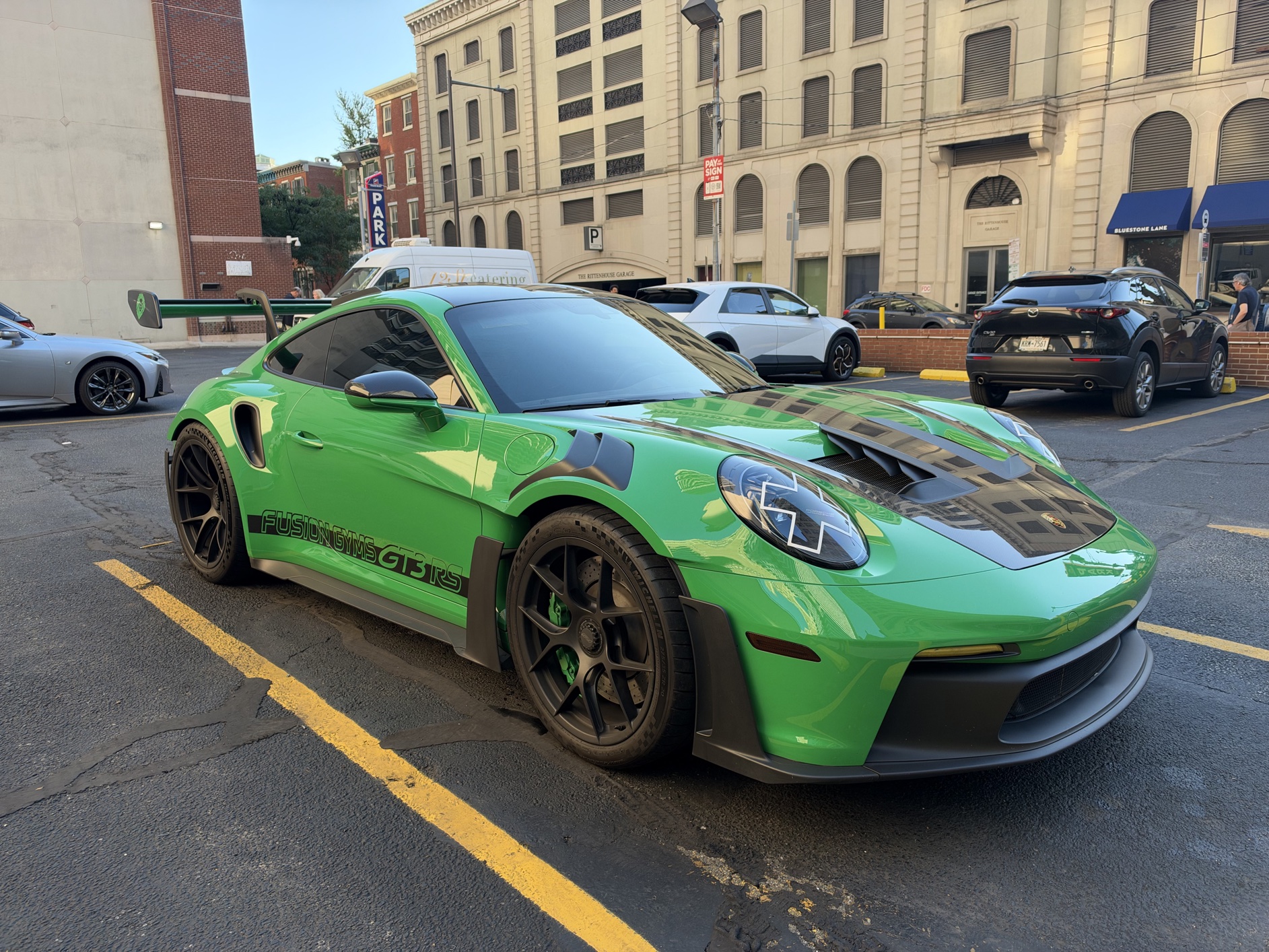
Same image, with Film texture at 100, Grain off:
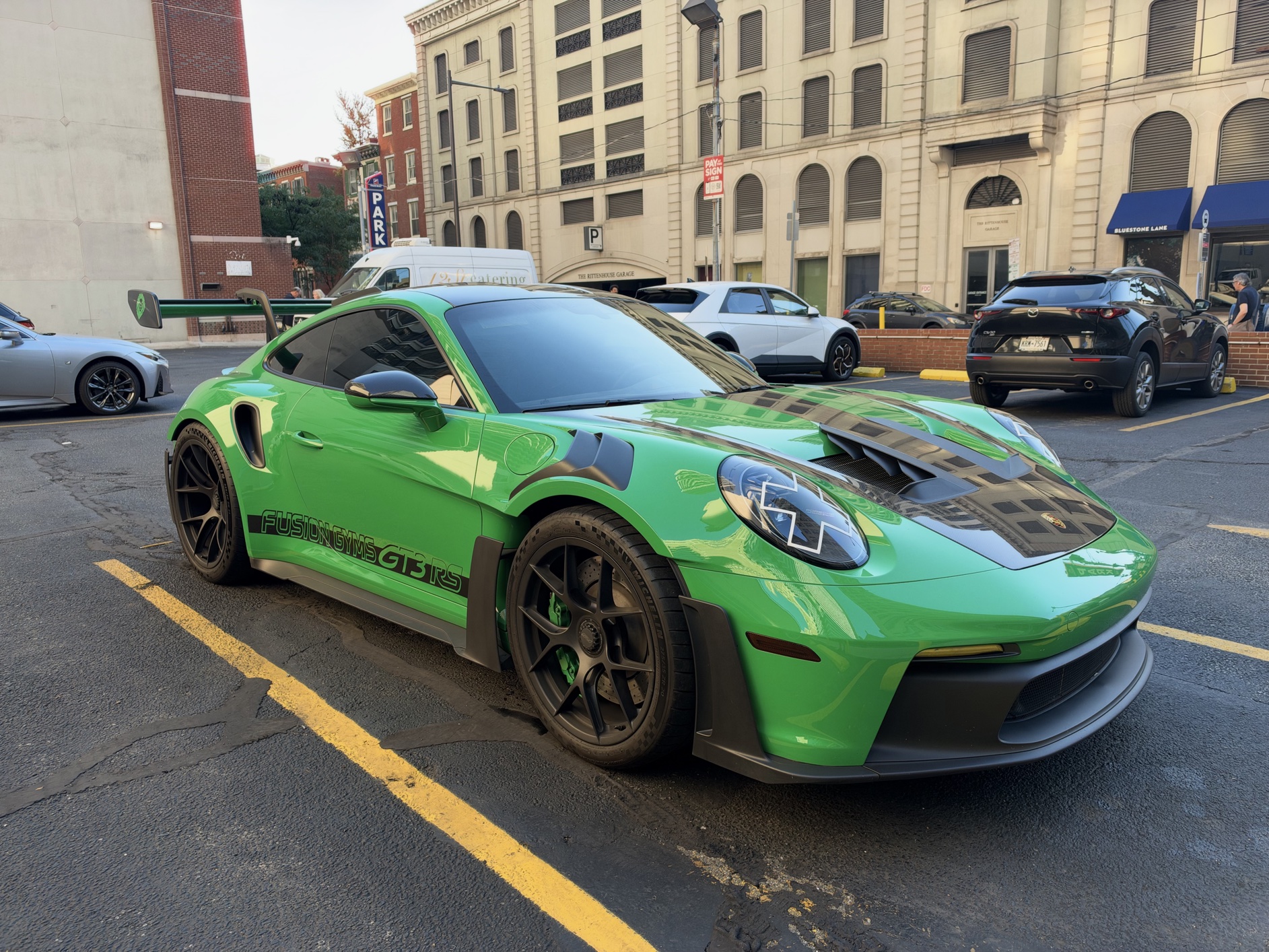
That image helps show the effect of the Film texture, without adding any grain. Here it is with Film at 100, with Grain:
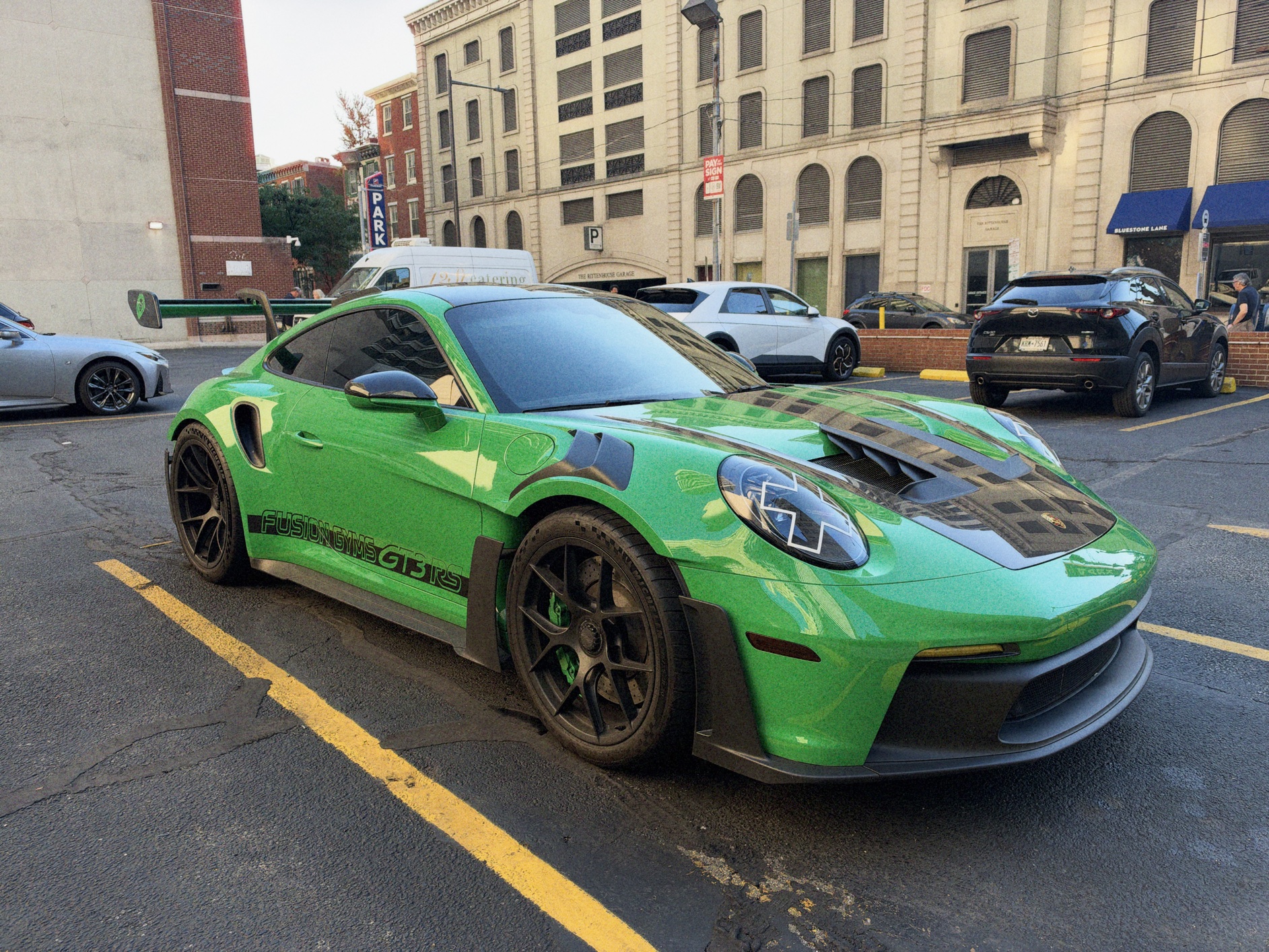
I’m a grain fan myself, but in this particular image, the grain prevents the image from representing the nature of the car’s smooth green finish. A perfect example of why it’s so great that Photographic Styles are non-destructive. You might shoot with Film + Grain by default, but want to disable Grain on an image like this one after you’ve looked at it.
One last photo. This one is a picture of Carl, my favorite employee at my favorite local hardware store. I’ll start again with the default look, the Standard style with no texture:

Now here’s the same image, with Film texture at 100, no Grain:

And with Film at 100, with Grain:

If you look closely at Carl’s face in those last two, with Film at 100, you’ll see what I consider unpleasant halation above his snout. Here’s the same image, keeping Grain on, but with the Film texture dialed back to 33:

I prefer that one, by far.
OK, OK, I get it. You want another picture of Carl. Here he is with the Standard style, no texture:

Same photo, but this time with the Natural base style (my personal favorite, with Tone: -60, Color: +25), Film at 100, with Grain:

The halation around Carl’s head in that photo is undeniably distracting. It looks like the poor guy is radioactive or something. I absolutely love that Apple added this Film texture to Photographic Styles, but I think the default strength should be quite a bit lower than 100. Here’s that same image with Grain still on, but Film texture dialed back to 50:

Now that’s a good photo of a good boy.
Conclusion
The most exciting iPhone years are those when the new flagship screams “new”. But the best iPhone models were the ones from the S years. I only included one S model in my top-five Hall of Fame list above: the iPhone 5S from 2013.3 But that’s in some ways profoundly unfair to the S models. The iPhone XS was a much better camera than the iPhone X. The iPhone 4S introduced Siri, which was actually amazing for its time. And not only was the 3GS far better than the 3G, but the 3G was much better than the original iPhone simply for going from EDGE to 3G networking.4 I have no affection for the 3G and 3GS devices because of their plastic bodies, but as practical devices, both were great improvements.
The S years (and S-type years, even when there’s no S in the name) are low on excitement but high on practical gains. That’s the iPhone 18 Pro. The one and only trade-off compared to the year-ago 17 Pro, in my utterly subjective opinion, is that cosmic orange was an iconic super-fun color and neither burgundy nor glacier have that appeal. That’s it: orange.5 Every other difference between the 18 Pro and 17 Pro, every single one, is something that is objectively better about the 18 Pro. Faster performance, better thermals, better cameras, longer battery life.
In the first decade of the iPhone, there were so many ways to improve the hardware that changes came fast and furious. It was breathtaking and exhilarating. At the end of the iPhone’s second decade, there are no longer big obvious ways to improve. Performance, battery life, durability, camera quality — all of those things are important, but all of them have been raised to the level of excellence. There may well be extraordinary breakthroughs to come, the sort of breakthroughs that only appear once a decade in an established product category. Waiting for those things to happen isn’t a strategy. Apple’s strategy is to push for incremental gains across the board, every single year, year after year after year. Do that, and the experience for someone upgrading every fourth or fifth year will be exhilarating.
I didn’t review the iPhone 17 Pro until last week, when I unabashedly declared it the best phone Apple had ever made. The iPhone 18 Pro is only different from the 17 Pro in ways that make it better. Thus, it is clearly now the new best phone Apple has ever made. It’s the culmination of an entire decade of year-after-year iteration on the iPhone X’s ground-up redesign. It’s the best version of the most successful product ever made. And yet by nature of how the iPhone 18 Pro improved in the last year, it’s not exciting at all. How jaded we all are.